Create Professional Videos Without Ever Going on Camera
Not everyone wants to be in front of a camera — and you don't need to be. Synthesia lets you create professional videos with a realistic AI avatar speaking your script, complete with customizable backgrounds and studio-quality delivery.
 Synthesiafoundersmarketersfreelancers
Try this starter prompt
Copy and paste this into ChatGPT or Claude with your details filled in. It's a simplified version — the full prompt chain is in the app.
You are helping me create a Synthesia video script.

Video purpose: [e.g. "onboarding video for new software users" / "explainer for our pricing plans"]
Target viewer: [WHO WATCHES — their situation and what they need to understand]
Key message: [THE ONE THING they should remember after watching]
Length: [60s / 90s / 2 min]

Write a video script formatted for Synthesia:
1. Opening hook (first 5 seconds — explains what this video is about and why they should watch)
2. Core content (3 key points, naturally paced for AI delivery)
3. Closing CTA (what to do next)

Include pacing notes: [PAUSE] markers where the avatar should pause naturally.

→ Get the full Synthesia video production workflow in AI School
How it works
- 1
Write your script with the structure above, keeping each section under 30 seconds
- 2
Choose an AI avatar that matches your brand or audience
- 3
Paste the script into Synthesia, set language and voice, and generate
- 4
Review for unnatural pacing, add [PAUSE] markers, and regenerate any awkward sections
What you'll build in the app
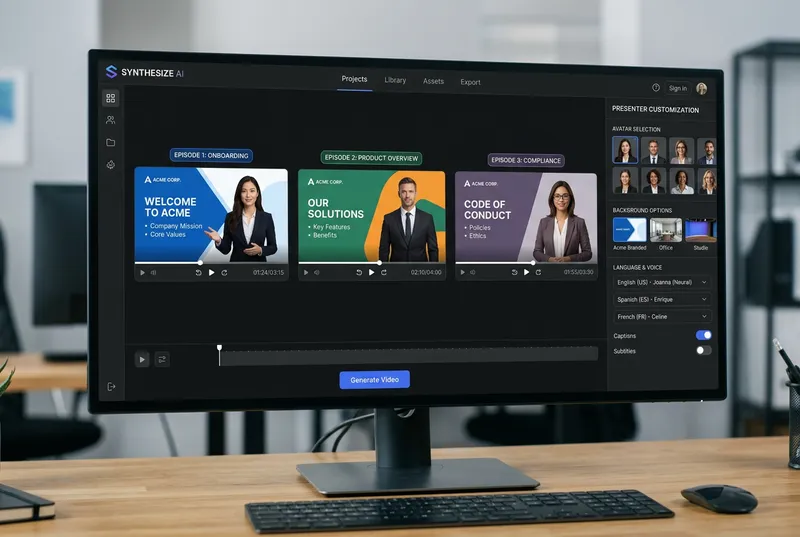
Get the full Synthesia production workflow — script templates, avatar selection guide, and use case library — inside AI School.
Want the full course?
Create Professional Videos Without Ever Going on Camera
Get the full Synthesia production workflow — script templates, avatar selection guide, and use case library — inside AI School.
Download on the App Store
 InVideo AI
 Murf
Murf
 ChatGPT
 Descript
 HeyGen